Plan with a full-year view
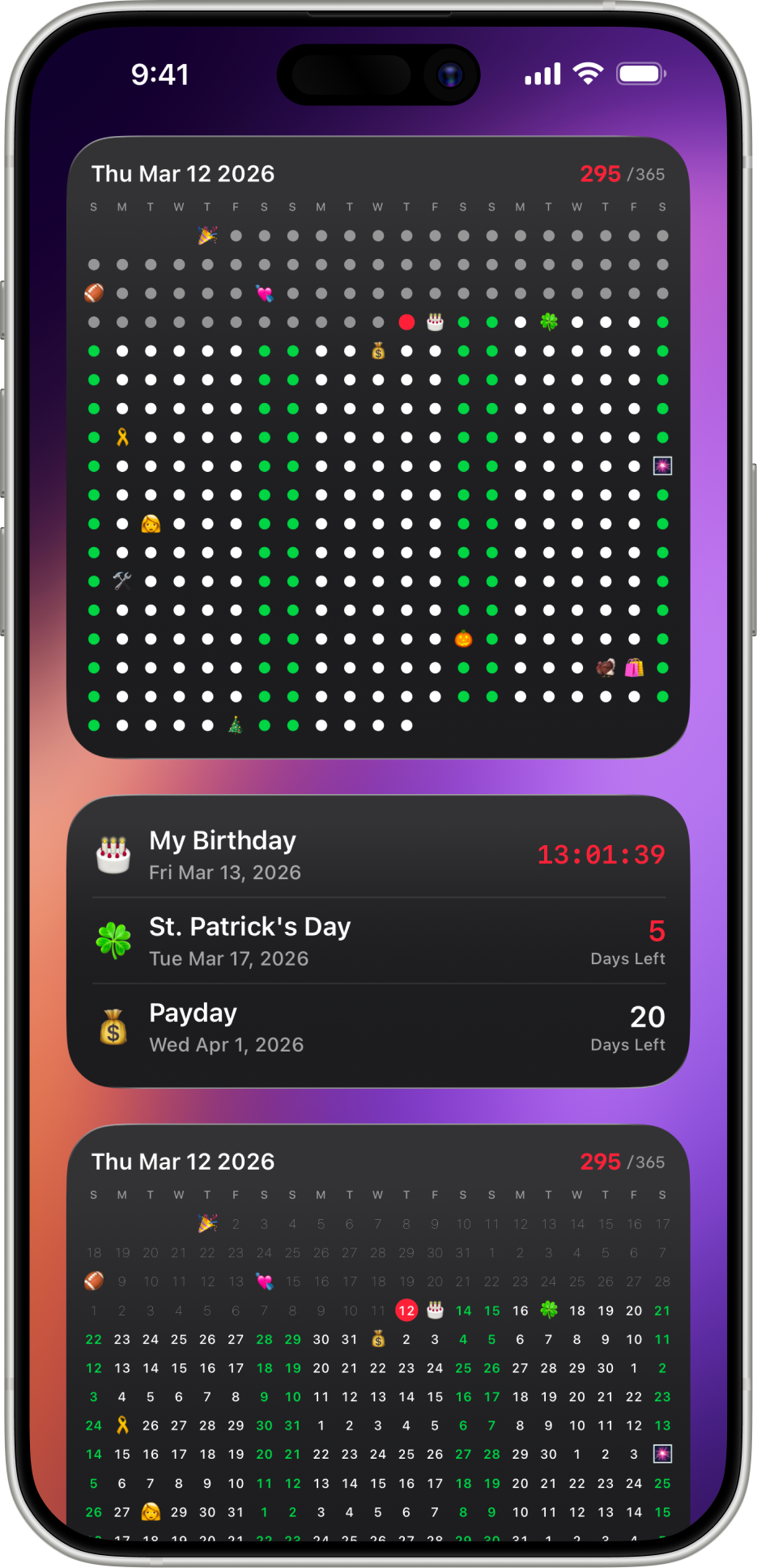
See upcoming dates in one clean grid so milestones, deadlines, vacations, and recurring plans never disappear into a list.
Countdown Widget for iPhone
The countdown widget for your Home Screen and Lock Screen. Track birthdays, trips, holidays, exams, and goals in a calm, year-at-a-glance calendar grid.
Event tracking
See upcoming dates in one clean grid so milestones, deadlines, vacations, and recurring plans never disappear into a list.
Use Home Screen and Lock Screen widgets to keep the next big day visible without opening the app.
Once an event is less than 24 hours away, the widget switches to a live countdown timer, so you know exactly how much time is left.
Create countdowns for birthdays, holidays, trips, goals, exams, launches, and personal routines with simple reminders.
Every event, one widget
Set them once and they repeat every year automatically, so a birthday countdown is never a scramble.
Watch the days-until count drop as a trip gets closer, right from your Home Screen.
Track built-in and custom holidays alongside everything else on the same year grid.
Give a milestone its own widget so the countdown stays visible every time you check your phone.
Keep deadlines in view with a live countdown timer once the date is under 24 hours away.
Track goals the same way as any other event — no separate habit tracker required.
Countdown widget FAQ
Day Grid is a countdown widget app that shows every event on a year-at-a-glance calendar grid, with Home Screen and Lock Screen widgets that count down automatically so you don't have to open the app to see what's next.
Long-press an empty area of your Home Screen, tap the + button in the top corner, search for "Day Grid," then choose a widget size and pick the event you want to count down to.
Yes. Day Grid supports unlimited events on the year grid, and you can add several widgets to your Home Screen and Lock Screen to keep multiple countdowns visible at once.
Yes. Day Grid includes Lock Screen widgets, and switches to a live countdown timer automatically once an event is less than 24 hours away.
Yes. Birthdays, anniversaries, and holidays can repeat every year automatically, so you only set them up once.
Day Grid is free to download with optional Pro upgrades. No account or sign-in is required — your events sync privately across your Apple devices with iCloud.
Day Grid is free to download on the App Store.
Featured on